
VS Code extension
Codex Quota
v0.9.2 · CC BY-NC-SA 4.0
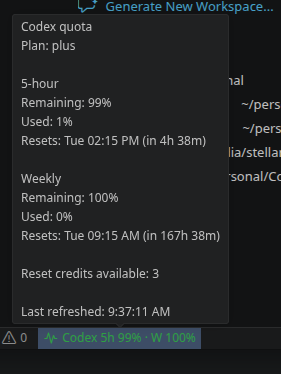

Shows your OpenAI Codex quota usage in the VS Code status bar: remaining percentage in the 5-hour and weekly windows.
Setup
No API key is needed, and this extension does not ask for or own one. It uses the official Codex CLI already installed and logged in on your machine. The CLI reads its own stored credentials. The extension starts it locally to read rate-limit data, then exits. It does not read workspace files or send prompts itself.
VS Code 1.74+ and the official Codex CLI are required. Run codex login first. If VS Code cannot find codex, set codexQuota.codexPath to its path in User settings. Requires a trusted, non-virtual workspace.
Source and user guide on GitHub ↗
Install
Download the .vsix below, then install it from a terminal.
Windows (PowerShell or CMD):
cd %USERPROFILE%\Downloads
code --install-extension codex-quota-0.9.2.vsix
macOS / Linux:
cd ~/Downloads
code --install-extension codex-quota-0.9.2.vsix
No terminal needed: in VS Code, open the Extensions view (Ctrl+Shift+X), click the ... menu, choose Install from VSIX... and pick the downloaded file.
Restart VS Code or run Developer: Reload Window.
Download codex-quota-0.9.2.vsix SHA-256 checksumChangelog
- 0.9.2 - Public source, CC BY-NC-SA 4.0 licensing and hardened release packaging/credential boundaries.
- 0.9.1 - Runs the vendored monitor regressions before testing and packaging.
- 0.9.0 - Shares the hardened status-bar monitor and app-server transport with the sibling quota extensions.
- 0.8.0 - Hardened early app-server exits and reports the real package version during the handshake.
- 0.7.0 - Excludes workspace-only files from the packaged extension.
- 0.6.0 - Discovers the Codex binary bundled with the installed OpenAI ChatGPT extension; an explicit
codexQuota.codexPathstill takes precedence. - 0.5.0 - Double-click the status bar item, or run Codex Quota: Open Usage Page, to open the official usage dashboard.
- 0.4.0 - Colour-band thresholds are configurable via
codexQuota.thresholds. - 0.3.1 - Green band uses a fixed green readable on both dark and light status bars; clearer failure logging.
- 0.3.0 - Green healthy band is now green text because VS Code only permits two status bar background colours.
- 0.2.0 - Status bar item gains colour bands driven by the most constrained window.
- 0.1.0 - Initial release: 5-hour and weekly Codex quota in the status bar via the Codex CLI app-server.