
VS Code extension
Claude Quota
v0.2.2 · CC BY-NC-SA 4.0
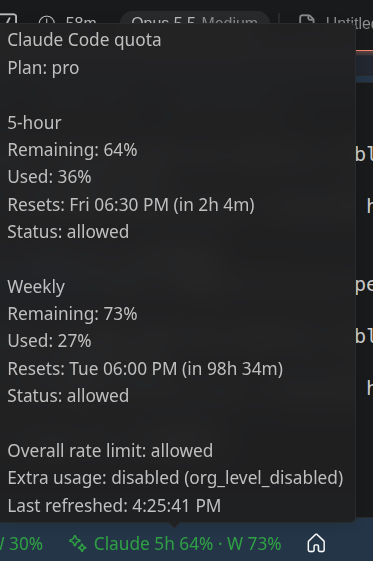
Shows your Claude Code subscription quota in the VS Code status bar: remaining percentage in the 5-hour and weekly windows.
Setup
No API key is needed, and this extension does not ask for or own one. It reads the credentials Claude Code has already stored locally. The credentials file is read-only and the extension never refreshes the token. On macOS, Claude Code stores credentials in the login Keychain, which this extension cannot read.
Source and user guide on GitHub ↗
Credential paths are User settings only. Requires a trusted, non-virtual workspace.
Install
Download the .vsix below, then install it from a terminal.
Windows (PowerShell or CMD):
cd %USERPROFILE%\Downloads
code --install-extension claude-quota-0.2.2.vsix
macOS / Linux:
cd ~/Downloads
code --install-extension claude-quota-0.2.2.vsix
No terminal needed: in VS Code, open the Extensions view (Ctrl+Shift+X), click the ... menu, choose Install from VSIX... and pick the downloaded file.
Restart VS Code or run Developer: Reload Window.
Download claude-quota-0.2.2.vsix SHA-256 checksumChangelog
- 0.2.2 - Public source, CC BY-NC-SA 4.0 licensing and hardened release packaging/credential boundaries.
- 0.2.1 - Settles interrupted usage responses, enforces absolute refresh deadlines, and improves Windows credential-path discovery.
- 0.1.0 - Initial release: read-only Claude Code 5-hour and weekly usage in the status bar via the Claude usage endpoint.