
TUTORIAL · BREAKOUT · STAGE 4 OF 8BETA
Stage 4 · Bricks
Forty-eight bricks, a collision test that only looks at the cells the ball could be touching, and a renderer that rubs out a broken brick on both screen pages. This is the biggest stage.
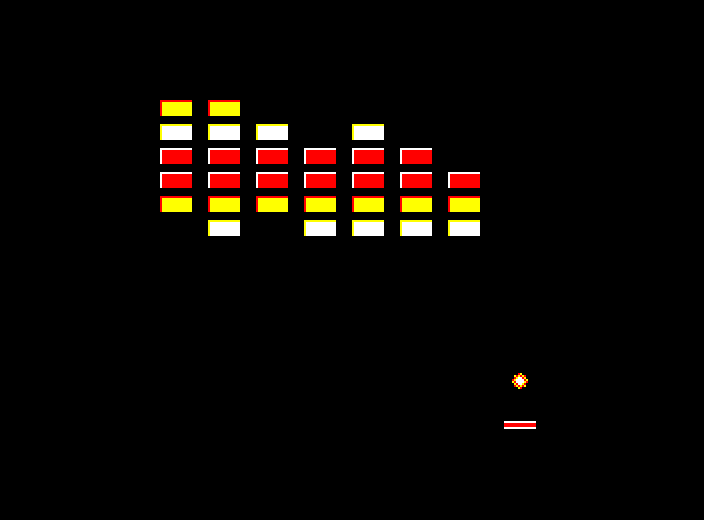
Type these 27 lines into the previous stage. Lines 20, 30 and 60 replace lines you already have: type them again in full. Or load the whole stage from the disc with CHAIN "STAGE4".
Text after :REM and indented continuation lines are Beeb-dev notes and layout: the build strips them, so they cost the BBC nothing. Typing into a real BBC, leave the notes out and join each continuation line onto the line above.
20 PROCeginit                                    :REM start EGFX: checks TOP<=&2200 and HIMEM=&2400,
    REM fills the 64-byte request block and makes sure EGFX is fitted
    :PROCegcompanion(7,&81,255)                  :REM register the 16x16 sprite pack at &8100 in
    REM slot 7 for the brick batches (255: no sideways RAM history bank)
30 DIM a%(5,7)                                   :REM brick strengths: 6 rows by 8, 0 = gone
    :l%=1                                        :REM level (PROCnextlevel adds one as it starts a level)
    :e%=4:f%=-4                                  :REM ball velocity in pixels a frame: right and up
    :PROCresetlevel                              :REM fill the grid for level 1
60 REPEAT                                        :REM one pass of the loop is one frame
    :IF d%>=3 PROCegbegin                        :REM new level: the rest of line 60 runs only now.
    REM BEGIN clears the hidden page...
    :PROCdrawbricks                              :REM ...draws the wall...
    :PROCbatdraw(p%):PROCegpresent               :REM ...and the bat, then shows it at vsync
    :PROCegbegin:PROCdrawbricks                  :REM the same again, because the Master has two
    :PROCbatdraw(p%)                             :REM screen pages and both must hold the field
    :PROCegpresent                               :REM before dirty frames can start
    :d%=0                                        :REM from here on, repaint only what changes
    :aa%=p%:u%=p%:bb%=192:v%=192                 :REM both pages are fresh, so restart the ball's
    REM erase history (any old position is already clean)
160 IF d%>0 AND d%<3 PROCbe                      :REM a broken brick is owed a repaint on this page
161 IF d%>0 AND d%<3 d%=d%-1                     :REM one page done (two in all, then d%=0)
355 IF ny%>107 OR ny%+7<40                       :REM outside the rectangle round the whole
     OR nx%+7<64 OR nx%>247 GOTO 380             :REM brick field? Skip the brick tests:
    REM most frames end here
360 r0%=(ny%-40)DIV12:IF r0%<0 r0%=0             :REM rows the ball's top and bottom
    REM edges touch (bricks every 12 pixels from Y=40), clamped to the grid
362 r1%=(ny%+7-40)DIV12:IF r1%>5 r1%=5
364 c0%=(nx%-64)DIV24:IF c0%<0 c0%=0             :REM and the columns its left and
    REM right edges touch (every 24 pixels from X=64)
366 c1%=(nx%+7-64)DIV24:IF c1%>7 c1%=7
368 h%=0                                         :REM no hit yet this frame
    :FOR rr%=r0% TO r1%:FOR ct%=c0% TO c1%       :REM at most 2x2 cells, never all 48
370 IF h%=0 AND a%(rr%,ct%)>0 PROCbrickhit       :REM a live brick: test it exactly
372 NEXT:NEXT
382 DEF PROCbrickhit                             :REM cell rr%,ct% holds a live brick
384 IF nx%>79+ct%*24 OR nx%+7<64+ct%*24          :REM the cell may only hold the gap:
     OR ny%>47+rr%*12 OR ny%+7<40+rr%*12         :REM no real overlap with the 16x8
     ENDPROC                                     :REM brick, so nothing happens
385 IF d%=1 PROCbe                               :REM a brick broken last frame still owes its second
    REM page: finish it now, before hr%/hc% are overwritten, or part of it
    REM stays behind on one page
386 h%=1                                         :REM one hit per frame
    :hr%=rr%:hc%=ct%:d%=2                        :REM remember the cell: repaint it on both pages
388 IF y%+7<40+rr%*12 OR y%>47+rr%*12            :REM if the ball was wholly above or
     f%=-f%                                      :REM below the brick last frame, it hit the top or bottom...
     ELSE e%=-e%                                 :REM ...otherwise a side
390 nx%=b%+e%:ny%=y%+f%                          :REM move away from the brick in this frame, so
    REM the ball is never drawn on top of it
394 a%(rr%,ct%)=0:n%=n%-1                        :REM broken: one fewer brick
    :IF n%=0 PROCnextlevel                       :REM that was the last one: next level
396 ENDPROC
400 DEF PROCresetlevel                           :REM fill the grid for level l%
    :n%=0                                        :REM count the bricks as they go in
    :FOR r%=0 TO 5:FOR c%=0 TO 7
402 s%=1                                         :REM every brick takes one hit (strong ones in stage 5)
404 a%(r%,c%)=s%:n%=n%+1
    :NEXT:NEXT:ENDPROC
410 DEF PROCnextlevel
    :l%=l%+1                                     :REM next level
    :e%=4+l%:f%=-e%                              :REM one pixel a frame faster each time
    :PROCresetlevel                              :REM a fresh wall
    :sv%=1                                       :REM ball back on the bat
    :d%=4                                        :REM redraw everything on both pages
    :ENDPROC
420 DEF PROCdrawbricks                           :REM the wall in six calls, not 48
    :FOR r%=0 TO 5                               :REM one batch per row
    :egb%?8=8                                    :REM eight sprites in this request
    :FOR c%=0 TO 7                               :REM each record is five bytes from byte 16:
    :egb%?(16+c%*5)=2+r%                         :REM the frame (2-7: one brick colour per row)
    :egb%?(17+c%*5)=(64+c%*24) AND 255           :REM X low byte
    :egb%?(18+c%*5)=0                            :REM X high byte
    :egb%?(19+c%*5)=40+r%*12                     :REM Y low byte
    :egb%?(20+c%*5)=0                            :REM Y high byte
    :NEXT
    :PROCegcall(34)                              :REM function 34: draw the batch from the pack
    REM registered on line 20, one OSWORD for eight bricks
    :NEXT:ENDPROC
530 DEF PROCbe                                   :REM repaint brick hr%,hc% on this page
    :PROCegcompact(64+hc%*24,40+hr%*12           :REM at the brick's top-left...
    ,9+SGN(a%(hr%,hc%))*(hr%-7)                  :REM ...frame 9 (a half-height black eraser)
    REM if the brick has gone, or 9+(row-7) = row+2, the row's own brick
    REM frame, if it still has hits left
    ,0,7,&81)                                    :REM no transform, slot 7, the 16x16 pack at &81
    :ENDPROC
The brick field
400 DEF PROCresetlevel                           :REM fill the grid for level l%
    :n%=0                                        :REM count the bricks as they go in
    :FOR r%=0 TO 5:FOR c%=0 TO 7
402 s%=1                                         :REM every brick takes one hit (strong ones in stage 5)
404 a%(r%,c%)=s%:n%=n%+1
    :NEXT:NEXT:ENDPROC
410 DEF PROCnextlevel
    :l%=l%+1                                     :REM next level
    :e%=4+l%:f%=-e%                              :REM one pixel a frame faster each time
    :PROCresetlevel                              :REM a fresh wall
    :sv%=1                                       :REM ball back on the bat
    :d%=4                                        :REM redraw everything on both pages
    :ENDPROC
a%(r%,c%) holds each brick's remaining hits, 0 for gone. Bricks are 16×8 pixels on a 24×12 grid starting at (64,40), which leaves 8-pixel gaps across and 4-pixel gaps down. n% counts the live bricks, so clearing a level costs nothing to spot, and PROCnextlevel refills the field and makes the ball one pixel a frame faster. For now every brick takes one hit (line 402): stage 5 adds the strong ones.
Drawing 48 bricks in six calls
20 PROCeginit                                    :REM start EGFX: checks TOP<=&2200 and HIMEM=&2400,
    REM fills the 64-byte request block and makes sure EGFX is fitted
    :PROCegcompanion(7,&81,255)                  :REM register the 16x16 sprite pack at &8100 in
    REM slot 7 for the brick batches (255: no sideways RAM history bank)
420 DEF PROCdrawbricks                           :REM the wall in six calls, not 48
    :FOR r%=0 TO 5                               :REM one batch per row
    :egb%?8=8                                    :REM eight sprites in this request
    :FOR c%=0 TO 7                               :REM each record is five bytes from byte 16:
    :egb%?(16+c%*5)=2+r%                         :REM the frame (2-7: one brick colour per row)
    :egb%?(17+c%*5)=(64+c%*24) AND 255           :REM X low byte
    :egb%?(18+c%*5)=0                            :REM X high byte
    :egb%?(19+c%*5)=40+r%*12                     :REM Y low byte
    :egb%?(20+c%*5)=0                            :REM Y high byte
    :NEXT
    :PROCegcall(34)                              :REM function 34: draw the batch from the pack
    REM registered on line 20, one OSWORD for eight bricks
    :NEXT:ENDPROC
Drawing 48 bricks with 48 calls would mean 48 trips through BASIC and the MOS at 1.7 cs each. PROCdrawbricks fills the request block itself, a count at byte 8 and eight 5-byte records (frame, X, Y) from byte 16, and calls function 34 once per row. Function 34 draws frames from the registered sprite pack, which is what PROCegcompanion(7,&81,255) on line 20 sets up. The field is drawn in full only on the first two frames of a level (line 60).
Cheap rejection first
355 IF ny%>107 OR ny%+7<40                       :REM outside the rectangle round the whole
     OR nx%+7<64 OR nx%>247 GOTO 380             :REM brick field? Skip the brick tests:
    REM most frames end here
360 r0%=(ny%-40)DIV12:IF r0%<0 r0%=0             :REM rows the ball's top and bottom
    REM edges touch (bricks every 12 pixels from Y=40), clamped to the grid
362 r1%=(ny%+7-40)DIV12:IF r1%>5 r1%=5
364 c0%=(nx%-64)DIV24:IF c0%<0 c0%=0             :REM and the columns its left and
    REM right edges touch (every 24 pixels from X=64)
366 c1%=(nx%+7-64)DIV24:IF c1%>7 c1%=7
368 h%=0                                         :REM no hit yet this frame
    :FOR rr%=r0% TO r1%:FOR ct%=c0% TO c1%       :REM at most 2x2 cells, never all 48
370 IF h%=0 AND a%(rr%,ct%)>0 PROCbrickhit       :REM a live brick: test it exactly
372 NEXT:NEXT
Line 355 handles most frames: if the ball is outside the rectangle around the whole field, it skips straight to line 380. Inside it, the ball's corners give a row range and a column range, at most 2×2 cells, and only those are checked, never all 48.
The exact test and the bounce
382 DEF PROCbrickhit                             :REM cell rr%,ct% holds a live brick
384 IF nx%>79+ct%*24 OR nx%+7<64+ct%*24          :REM the cell may only hold the gap:
     OR ny%>47+rr%*12 OR ny%+7<40+rr%*12         :REM no real overlap with the 16x8
     ENDPROC                                     :REM brick, so nothing happens
385 IF d%=1 PROCbe                               :REM a brick broken last frame still owes its second
    REM page: finish it now, before hr%/hc% are overwritten, or part of it
    REM stays behind on one page
386 h%=1                                         :REM one hit per frame
    :hr%=rr%:hc%=ct%:d%=2                        :REM remember the cell: repaint it on both pages
388 IF y%+7<40+rr%*12 OR y%>47+rr%*12            :REM if the ball was wholly above or
     f%=-f%                                      :REM below the brick last frame, it hit the top or bottom...
     ELSE e%=-e%                                 :REM ...otherwise a side
390 nx%=b%+e%:ny%=y%+f%                          :REM move away from the brick in this frame, so
    REM the ball is never drawn on top of it
394 a%(rr%,ct%)=0:n%=n%-1                        :REM broken: one fewer brick
    :IF n%=0 PROCnextlevel                       :REM that was the last one: next level
396 ENDPROC
PROCbrickhit does a proper rectangle-overlap test, because a candidate cell may only contain the gap. On the first real hit it works out the bounce from the ball's old position: if the ball was completely above or below the brick it reverses vertically, otherwise it hit a side and reverses horizontally. Line 390 then moves the ball away from the brick in the same frame, so it is never drawn on top of the brick it hit.
Rubbing out a brick on both pages
160 IF d%>0 AND d%<3 PROCbe                      :REM a broken brick is owed a repaint on this page
161 IF d%>0 AND d%<3 d%=d%-1                     :REM one page done (two in all, then d%=0)
530 DEF PROCbe                                   :REM repaint brick hr%,hc% on this page
    :PROCegcompact(64+hc%*24,40+hr%*12           :REM at the brick's top-left...
    ,9+SGN(a%(hr%,hc%))*(hr%-7)                  :REM ...frame 9 (a half-height black eraser)
    REM if the brick has gone, or 9+(row-7) = row+2, the row's own brick
    REM frame, if it still has hits left
    ,0,7,&81)                                    :REM no transform, slot 7, the 16x16 pack at &81
    :ENDPROC
A broken brick has to disappear from both screen pages, one frame each. d%=2 says a cell needs repairing and hr%/hc% say which. Lines 160–161 call PROCbe once per frame for two frames. PROCbe draws frame 9 (a half-height black eraser) for a brick that has gone, or the row's brick frame (2–7) for one that is still there. If another brick breaks in the very next frame, line 385 finishes the first brick's second page before taking on the new one, otherwise part of the old brick would stay behind on one page.
The whole of stage 4, ready to type in: the EGFX helpers merged and the notes stripped (87 BASIC lines)
5 MODE 1:HIMEM=&2400
20 PROCeginit:PROCegcompanion(7,&81,255)
30 DIM a%(5,7):l%=1:e%=4:f%=-4:PROCresetlevel
40 PROCstartscreen
50 p%=152:b%=160:y%=192:sv%=1:d%=4:u%=b%:v%=y%:w%=p%:aa%=b%:bb%=y%:cc%=p%
60 REPEAT:IF d%>=3 PROCegbegin:PROCdrawbricks:PROCbatdraw(p%):PROCegpresent:PROCegbegin:PROCdrawbricks:PROCbatdraw(p%):PROCegpresent:d%=0:aa%=p%:u%=p%:bb%=192:v%=192
65 PROCegdirtybegin
75 z%=INKEY(-98):x%=INKEY(-67):sp%=INKEY(-99)
80 IF z% p%=p%-12
90 IF x% p%=p%+12
100 IF p%<8 p%=8
110 IF p%>288 p%=288
120 IF sv%=1 b%=p%+8:y%=192:IF sp% sv%=0
130 IF sv%=0 PROCmoveball
150 IF aa%<>b% OR bb%<>y% PROCegcompact(aa%,bb%,1,0,7,&87)
155 IF cc%<>p% PROCbatclear(cc%)
160 IF d%>0 AND d%<3 PROCbe
161 IF d%>0 AND d%<3 d%=d%-1
180 IF cc%<>p% OR (bb%<=205 AND bb%+7>=202 AND aa%<=p%+15 AND aa%+7>=p%) PROCbatdraw(p%)
181 IF sv%<>2 PROCegcompact(b%,y%,0,0,7,&87)
185 aa%=u%:bb%=v%:cc%=w%:u%=b%:v%=y%:w%=p%
190 PROCegpresent
200 UNTIL INKEY(-17)
210 MODE 7:END
220 DEF PROCstartscreen
230 PROCegbegin:FOR y%=24 TO 88 STEP 8:PROCegline(40,y%,280,y%,(y% DIV 8) MOD 4):NEXT:PROCegtext("BRICKFALL",120,48):PROCegline(64,80,256,80,3)
240 PROCegtext("PRESS SPACE",112,176):PROCegpresent
250 REPEAT:UNTIL INKEY(0)=32:*FX 15
260 ENDPROC
300 DEF PROCmoveball
310 nx%=b%+e%:ny%=y%+f%
320 IF nx%<=8 nx%=8:e%=-e%
325 IF nx%>=288 nx%=288:e%=-e%
330 IF ny%<24 ny%=24:f%=-f%
340 IF ny%>240 sv%=1:f%=-4:nx%=p%+8:ny%=192
350 IF ny%<=205 AND ny%+7>=202 AND f%>0 AND nx%+3>=p% AND nx%+3<p%+16 ny%=194:f%=-f%:e%=e%+SGN(nx%+3-p%-8)
355 IF ny%>107 OR ny%+7<40 OR nx%+7<64 OR nx%>247 GOTO 380
360 r0%=(ny%-40)DIV12:IF r0%<0 r0%=0
362 r1%=(ny%+7-40)DIV12:IF r1%>5 r1%=5
364 c0%=(nx%-64)DIV24:IF c0%<0 c0%=0
366 c1%=(nx%+7-64)DIV24:IF c1%>7 c1%=7
368 h%=0:FOR rr%=r0% TO r1%:FOR ct%=c0% TO c1%
370 IF h%=0 AND a%(rr%,ct%)>0 PROCbrickhit
372 NEXT:NEXT
380 b%=nx%:y%=ny%:ENDPROC
382 DEF PROCbrickhit
384 IF nx%>79+ct%*24 OR nx%+7<64+ct%*24 OR ny%>47+rr%*12 OR ny%+7<40+rr%*12 ENDPROC
385 IF d%=1 PROCbe
386 h%=1:hr%=rr%:hc%=ct%:d%=2
388 IF y%+7<40+rr%*12 OR y%>47+rr%*12 f%=-f% ELSE e%=-e%
390 nx%=b%+e%:ny%=y%+f%
394 a%(rr%,ct%)=0:n%=n%-1:IF n%=0 PROCnextlevel
396 ENDPROC
400 DEF PROCresetlevel:n%=0:FOR r%=0 TO 5:FOR c%=0 TO 7
402 s%=1
404 a%(r%,c%)=s%:n%=n%+1:NEXT:NEXT:ENDPROC
410 DEF PROCnextlevel:l%=l%+1:e%=4+l%:f%=-e%:PROCresetlevel:sv%=1:d%=4:ENDPROC
420 DEF PROCdrawbricks:FOR r%=0 TO 5:egb%?8=8:FOR c%=0 TO 7:egb%?(16+c%*5)=2+r%:egb%?(17+c%*5)=(64+c%*24) AND 255:egb%?(18+c%*5)=0:egb%?(19+c%*5)=40+r%*12:egb%?(20+c%*5)=0:NEXT:PROCegcall(34):NEXT:ENDPROC
500 DEF PROCbatclear(x%):bt%=&6E82+2*x%:FOR q%=0 TO 3:!bt%=0:bt%=bt%+8:NEXT:ENDPROC
510 DEF PROCbatdraw(x%):bt%=&6E82+2*x%:FOR q%=0 TO 3:!bt%=&FF0F0FFF:bt%=bt%+8:NEXT:ENDPROC
530 DEF PROCbe:PROCegcompact(64+hc%*24,40+hr%*12,9+SGN(a%(hr%,hc%))*(hr%-7),0,7,&81):ENDPROC
1000 DEF PROCeginit
1010 IF HIMEM>&2400 OR TOP>&2200 PRINT "EGFX MEM":END
1020 DIM egb% 63:LOCAL egi%
1025 FOR egi%=0 TO 63:egb%?egi%=0:NEXT
1040 egb%?0=64:egb%?1=8:egb%?2=69:egb%?3=71:egb%?4=1
1045 PROCegcall(0):ENDPROC
1050 DEF PROCegcall(egf%)
1070 egb%?5=egf%:egb%?7=0
1080 A%=&C0:X%=egb% MOD 256:Y%=egb% DIV 256:CALL &FFF1
1090 IF egb%?7<>&A5 PRINT "NO EGFX ROM":END
1095 IF egf%>=11 AND egf%<>22 AND egf%<>23 AND egb%?6<>0 PRINT "EG ERROR":END
1100 ENDPROC
1110 DEF PROCegxy(egx%,egy%)
1120 egb%?8=egx%:egb%?9=egx% DIV 256
1130 egb%?10=egy%:egb%?11=egy% DIV 256:ENDPROC
1140 DEF PROCegbegin:PROCegcall(1):ENDPROC
1144 DEF PROCegdirtybegin:egb%?8=255:PROCegcall(38):ENDPROC
1150 DEF PROCegpresent:PROCegcall(6):ENDPROC
1180 DEF PROCegtext(egs$,egx%,egy%)
1190 PROCegxy(egx%,egy%):$(egb%+22)=egs$+CHR$0:PROCegcall(7):ENDPROC
1260 DEF PROCegline(egx%,egy%,egex%,egey%,egc%)
1270 PROCegxy(egx%,egy%):egb%?13=egc%:egb%?16=egex% AND 255:egb%?17=(egex% AND &FFFF) DIV 256
1280 egb%?20=egey% AND 255:egb%?21=(egey% AND &FFFF) DIV 256:PROCegcall(10):ENDPROC
1820 DEF PROCegcompanion(b%,p%,h%):egb%?8=b%:egb%?9=p%:egb%?10=h%:PROCegcall(33):ENDPROC
2110 DEF PROCegcompact(x%,y%,i%,f%,b%,p%)
2120 PROCegxy(x%,y%):egb%?12=i%:egb%?14=f%:egb%?16=b%:egb%?17=p%:PROCegcall(37):ENDPROC
Try it: score nothing yet, but count the bricks you break in a variable and PRINT it after quitting. Or change the grid to 7 rows (the array, the loops and the field rectangle on line 355 all need to agree).